
Ordering through LitBuy, with the evidence trail kept from the start
A first LitBuy order from link to delivery. Each stage leaves something you may need later: the order line, the QC photos, the packed weight and the Delivered scan.
LitBuy, the agent behind the order, and its operator
LitBuy works as a buying agent. It purchases from Chinese marketplaces that are awkward to pay on from abroad, takes delivery in Xiamen, looks over and photographs what arrives, and sends it overseas as one parcel when you say so. It acts on your behalf with the seller, which is why a problem with the item and a problem with the parcel end up on different desks. Each hand-over leaves a record somewhere, and the last one, the local carrier's Delivered scan, is the one every after-sales limit is measured from.
LitBuy's site terms are issued by LITBUY LIMITED, a company in the United Kingdom; its app listings name a Hong Kong company as developer. Its earliest dated pages are from 2025. LitBuy says it charges no purchasing service fee; what that leaves for you to pay is on the charges and shipping page.
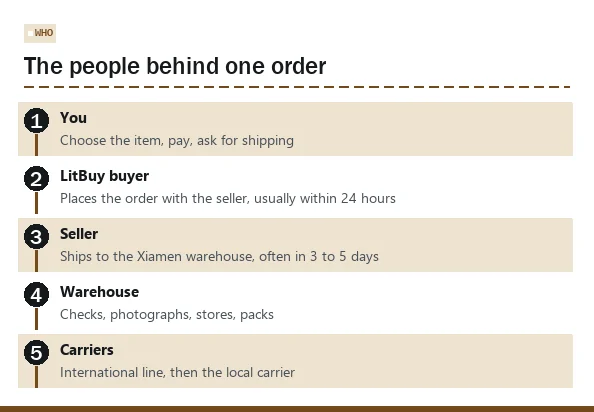
Stage one: the link, the options and the payment
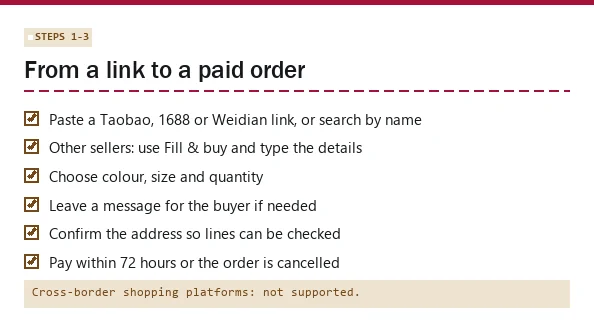
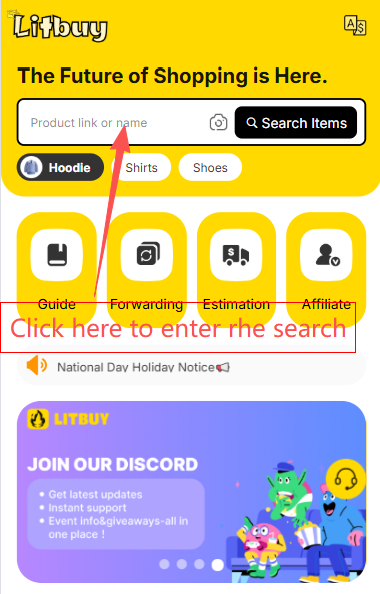
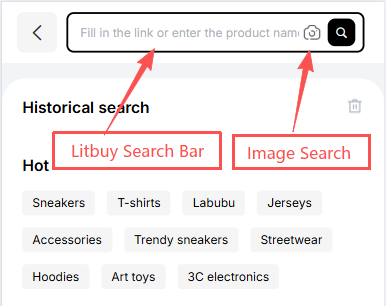
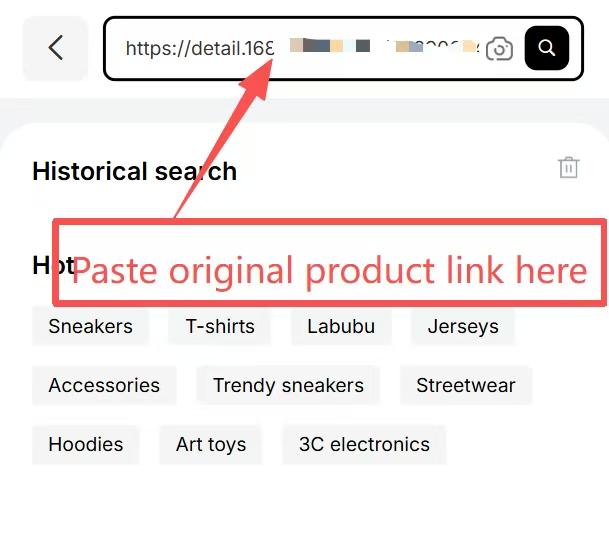
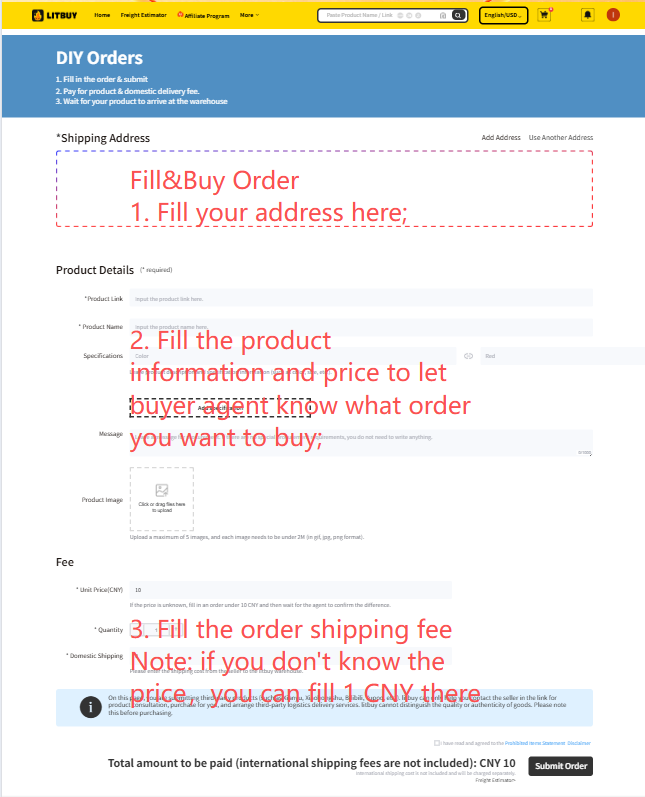
Here are the steps, in order. Step 1: find the product. LitBuy takes links from Taobao, 1688 and Weidian pasted into its search bar, and lets you search by product name. For sellers it cannot read directly, a form called Fill & buy lets you type the details yourself; if the price is unknown, LitBuy suggests entering 1 CNY as a placeholder and the buyer settles the difference.
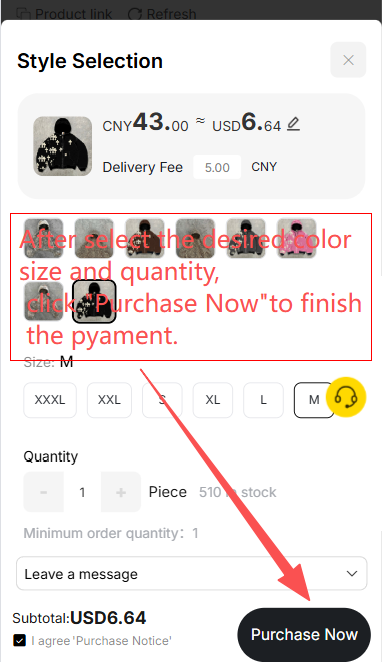
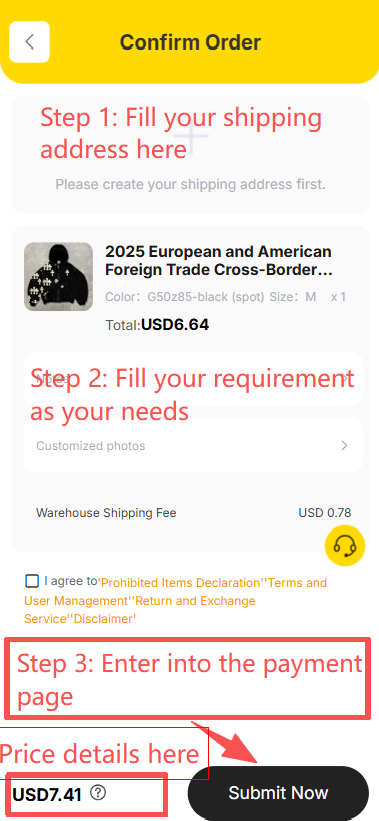
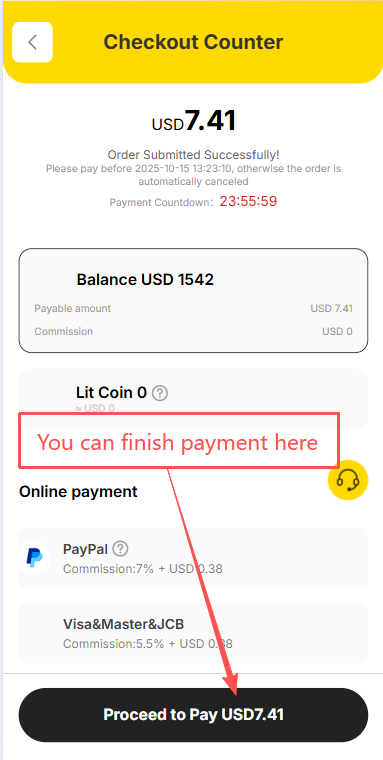
Step 2: pick colour, size and quantity, and use the message field for anything the buyer should ask the seller. Step 3: confirm the address so LitBuy can check which shipping lines reach you, and pay. An unpaid order is cancelled automatically after 72 hours. Note that LitBuy says it cannot buy from cross-border shopping platforms.
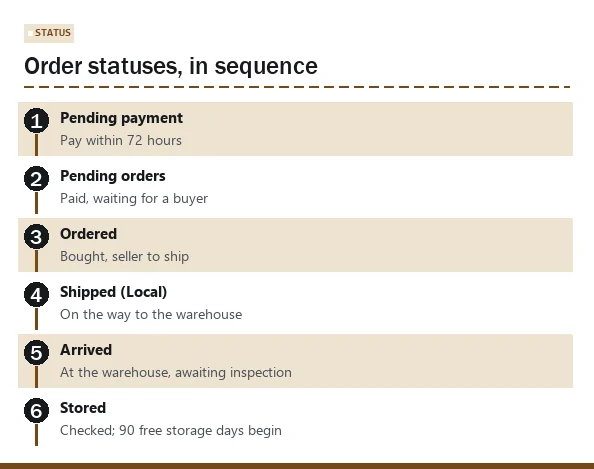
The seller ships to Xiamen, and the order statuses change
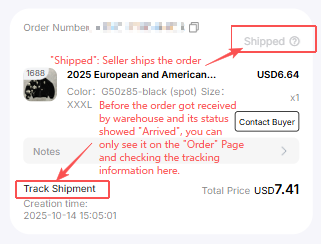
After payment the order queues for a buyer, then shows Ordered once it has been bought. Shipped (Local) means the seller has sent it to the warehouse, normally 3 to 5 days away. Arrived means it is at the warehouse awaiting inspection; Stored means it has been checked and the 90 free storage days have started.
If the seller's real price or its domestic postage comes to more than you paid, the order moves to Clear Balance until you pay the difference. A cancelled order refunds to your LitBuy wallet. None of this involves evidence yet, but the dates matter: the Stored date is when your warehouse photos appear.
Two of these statuses leave records worth keeping: the Arrived and Stored timestamps, because they date the warehouse photos, and any Clear Balance request, because it shows what the seller really charged. A screenshot takes seconds and can settle a question months later.
Warehouse QC photos: your before picture
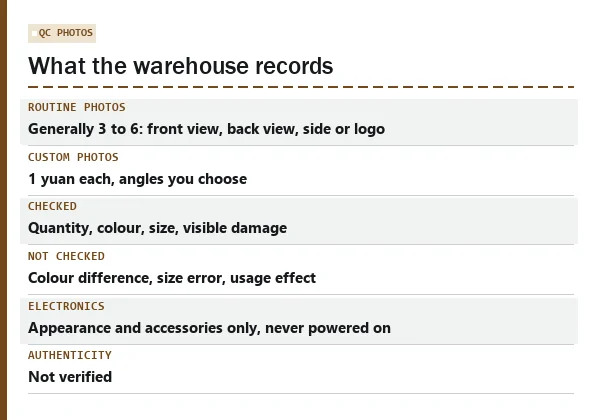
When an item is checked in, the warehouse verifies quantity, colour, size and other specifications, removes the seller's outer box and repacks the item in a LitBuy self-sealing bag. The routine QC set is generally 3 to 6 standard-resolution shots: a front view, a back view and one of a side or the logo. Sharper photos from angles you name are sold separately; LitBuy's help page prices them at 1 yuan each.
Know what the check skips. LitBuy's inspection page excludes colour difference, size error and usage effect; for electrical and digital products it looks at appearance and accessories only, without powering anything on; sealed CDs, handmade and adult products are judged from the outside. LitBuy prohibits counterfeit goods and also says plainly that it cannot confirm whether a product is authentic, so treat these photos as a record of condition and nothing more.
How to judge QC photos while the parcel is still in Xiamen
Treat the QC photos as the first half of a before-and-after pair. Count the items against the order. Compare the colour with the listing photo, knowing that LitBuy will not argue about shades. Look for a readable size label; if none is visible and size matters, order a custom photo of the label now, because LitBuy says it cannot verify size problems without one.
Zoom in on edges, seams, straps, buckles and screens, and note anything already marked. Check that every accessory in the listing is in the photo. Save the QC photos outside the app. If the item arrives damaged, a clean QC photo next to your doorstep close-up shows where the damage happened better than any description.
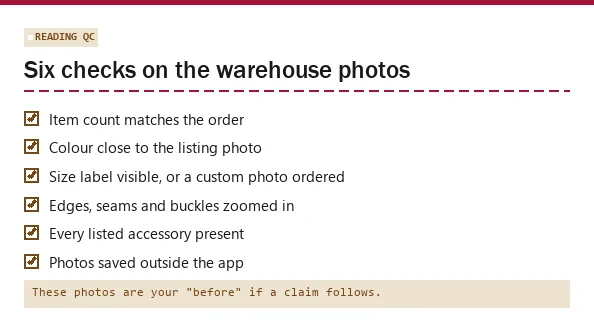
Make the warehouse photo a useful before picture
Compare the stored item with the actual selected option, not just the catalogue’s category photo. Check labels, quantity and visible damage, then request the detail that would settle an uncertainty. For a garment measurement, specify where the tape should run. A vague request for high quality cannot substitute for a measurable question.
If there is a mismatch, use the order enquiry before the applicable return window closes and before changing original packaging. Keep the relevant photo and response. Once the parcel is sent, those records can help distinguish what was already visible in China from a problem discovered at delivery. Ordinary QC still does not authenticate goods or test all functions, and the evidence must be considered with the applicable after-sales conditions.
Packing, shipping and the parcel statuses
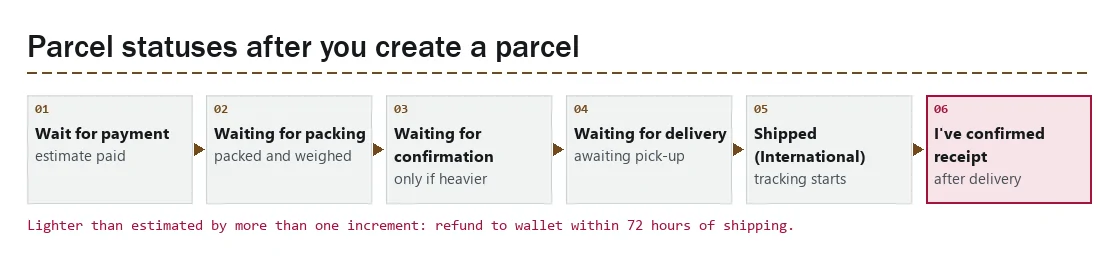
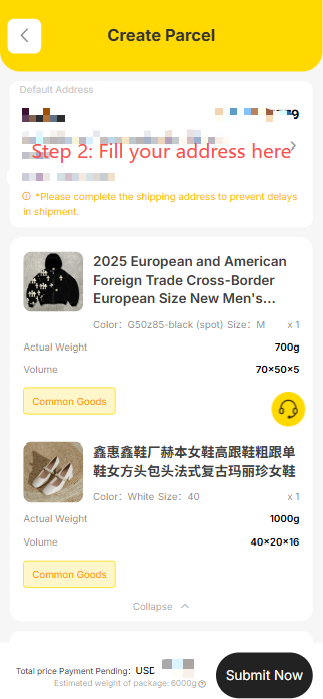
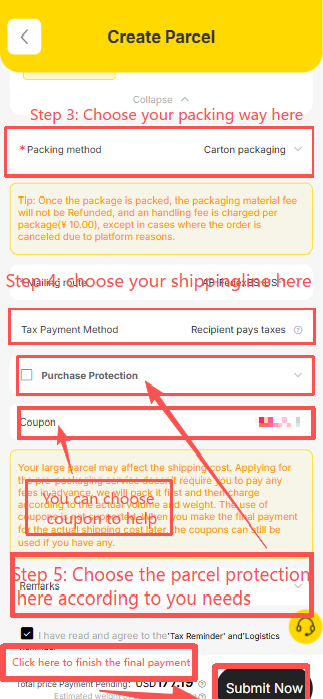
When you are ready, select items in your warehouse and create a parcel. You choose a shipping line and pay international shipping on an estimated weight. The packed parcel is then weighed and measured in Xiamen, and those numbers set the bill. Heavier than estimated: it waits in Waiting for Confirmation until you pay the difference. Lighter by more than one billing increment: LitBuy refunds the excess to your wallet within 72 hours of dispatch.
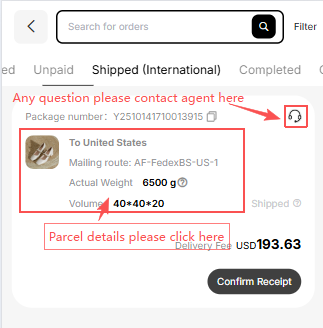
Then come Waiting for Delivery, Shipped (International) and, once you have it, I've confirmed receipt. Only one shipping coupon can be used per parcel. A customs declaration charge of generally RMB 10 per parcel applies, depending on the line.
Why LitBuy, judged on evidence, and when to pick a different agent
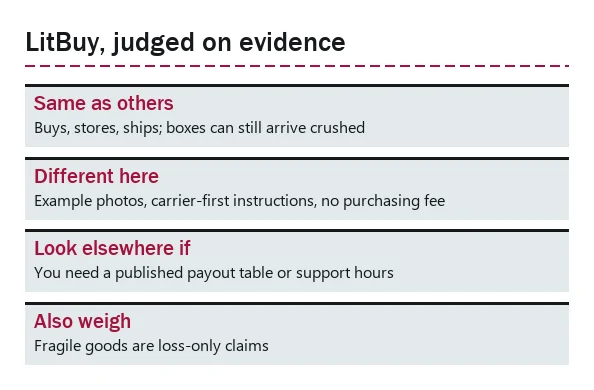
First, what is the same everywhere: every shopping agent buys for you, stores the goods, ships them on lines it resells, and charges for shipping one way or another. A missing item or a crushed box is possible with any of them.
What is different here, for the subject of this site: LitBuy publishes what a usable claim looks like, with a time-limit table, a documents table and eleven example photos, and it tells you to go to the local carrier first. It also says it takes no purchasing service fee and stores items free for 90 days.
When to look elsewhere: if you need a published compensation table before you buy, or published support hours, LitBuy does not offer either. If you mostly buy fragile goods, its loss-only rule for fragile items will matter. And it does not buy from cross-border shopping platforms.
The official buying screens, in order
LitBuy’s tutorial retained on 16 October 2026. These are older interface examples, not current price or availability quotes. Expand the stage you need; every image links to its original size.
1. Find an item
Search by product name, seller link or image. The catalogue helps you discover a listing; check the original seller page before ordering.
2. Create the order
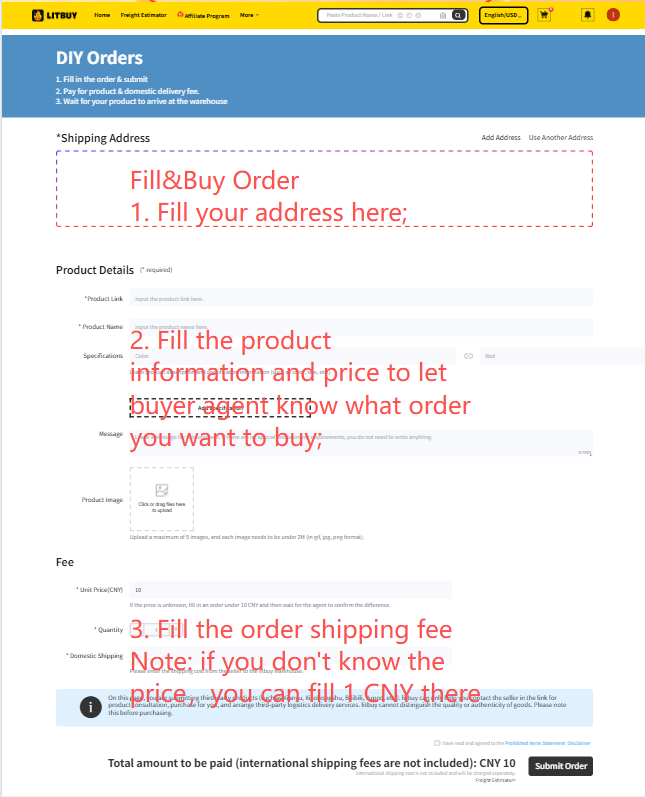
Paste a supported seller link. Use Fill&Buy for a supported listing that cannot be read directly, and confirm the final price. The official article repeats the Fill&Buy screen in images 4 and 5; it is not an extra order step.
3. Choose, confirm and pay
Select the correct variant and quantity, enter instructions, review the destination and pay for the goods and domestic shipping. The screenshot sequence shows variant selection, confirmation and checkout; these screens are offset from some headings in the official article.
4. Follow the seller order
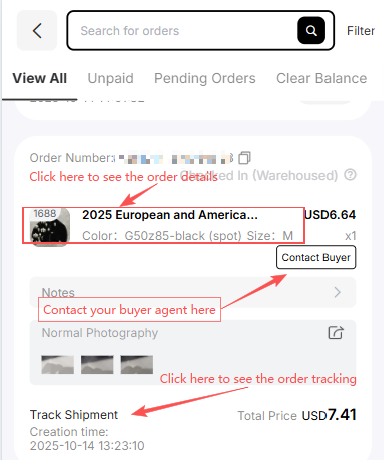
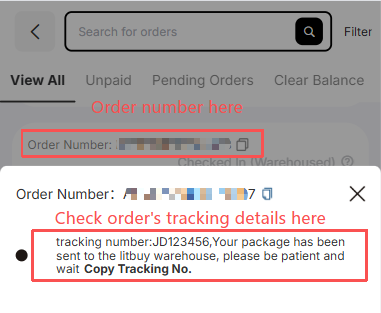
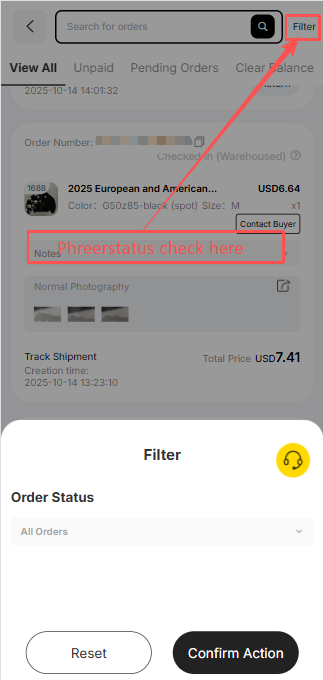
Use Orders to contact the buyer, inspect tracking and filter status. Seller shipment goes to the Chinese warehouse first. Arrival at the delivery point is not yet completed inspection or storage.
5. Inspect stored goods
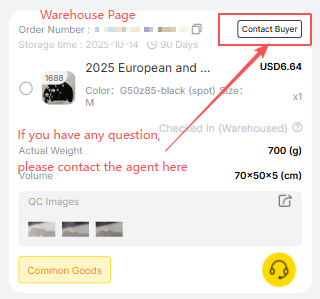
The Warehouse screen shows measurements, QC photos and the buyer contact. Check the actual variant and visible condition promptly, while a seller-agreed return may still be possible.
6. Create and pay for a parcel
Select stored goods, enter the recipient, choose packing and an eligible route, then check any coupon conditions and pay the shipping estimate. Confirm restrictions for the complete parcel.
7. Follow international shipping
The Parcel page records the dispatched parcel and support contact. Final packed weight and dimensions may change the shipping settlement; pictured prices and routes are examples.
8. Confirm actual receipt
Inspect the parcel and keep evidence before confirming actual delivery. Report a problem through the relevant carrier and LitBuy procedure promptly.
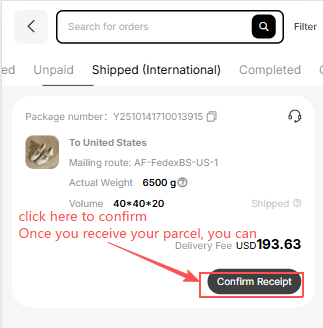
Official How to Use LitBuy article. Its nine status milestones are Order Submitted → Order Placed → Seller Shipped → Arrived at Warehouse → Inspection & Storage → Shipping Requested → Parcel Packed → Shipped → Delivered & Confirmed. Processing times in its summary and detailed text differ; follow the status of your own order.